Choose a source
Start with a photo, sketch, render, illustration, or other image that contains useful composition, shapes, colors, or subject information.
Image editing basics
What does image to image mean? It describes an image-generation method that starts with an existing picture and creates a revised picture from it, often guided by a text prompt.
Image to image uses a source picture as visual guidance, then changes its subject, style, details, or setting while preserving some of the original structure.
See how image-to-image workflows can preserve believable lighting, proportions, textures, and material detail.
Browse practical examples that show how a source image can guide several different visual outcomes.
Follow a straightforward beginner workflow from choosing a source image to refining the generated result.
The process is a conversation between a source image and a written instruction. The source supplies visual information; the prompt tells the model what to preserve, replace, or emphasize.
Start with a photo, sketch, render, illustration, or other image that contains useful composition, shapes, colors, or subject information.
Write a prompt that names the intended transformation, such as changing the season, visual style, clothing, materials, background, or lighting.
Adjust how strongly the model follows the source versus the prompt. A lighter transformation keeps more structure; a stronger one allows broader visual change.
Image to image is powerful, but it is not a precise replacement for every editing tool. Its output is generated, so important details may shift between attempts.
A face, character, product, or person may change subtly even when the source image is clear. Small features, proportions, and expressions can drift.
WorkaroundUse a strong source image, describe identity-critical details, and make smaller transformations.
The model may misunderstand spatial relationships, quantities, text, hands, logos, or unusual objects in the source and prompt.
WorkaroundUse short, concrete prompts and remove competing instructions before trying again.
A transformation can alter texture, lettering, background elements, colors, or lighting while it creates the requested style or scene.
WorkaroundKeep the change narrow, lower the transformation strength when available, and finish critical corrections in an editor.
A tiny, blurry, heavily compressed, or ambiguous image gives the model less reliable information to follow.
WorkaroundBegin with a sharp source image and crop it around the subject or composition that matters most.
Different users choose image to image because it keeps a visual starting point in the workflow. Compared with beginning from words alone, the source image gives the model a concrete composition or subject to interpret.
Image to image
An existing image plus optional text guidance
Text to image
A written description without a required source image
Image to image
Can follow the source layout, pose, silhouette, or perspective
Text to image
Builds composition from the prompt and model interpretation
Image to image
Useful for restyling a photo, sketch, render, or illustration
Text to image
Creates a style from descriptive language and learned visual patterns
Image to image
Can retain broad subject or scene cues from the source
Text to image
May invent the subject from the text description
Image to image
Iteration, variations, concept refinement, and visual continuity
Text to image
Exploration from a blank visual starting point
Image to image
Generated details can still drift from the source
Text to image
Composition and identity are harder to anchor precisely
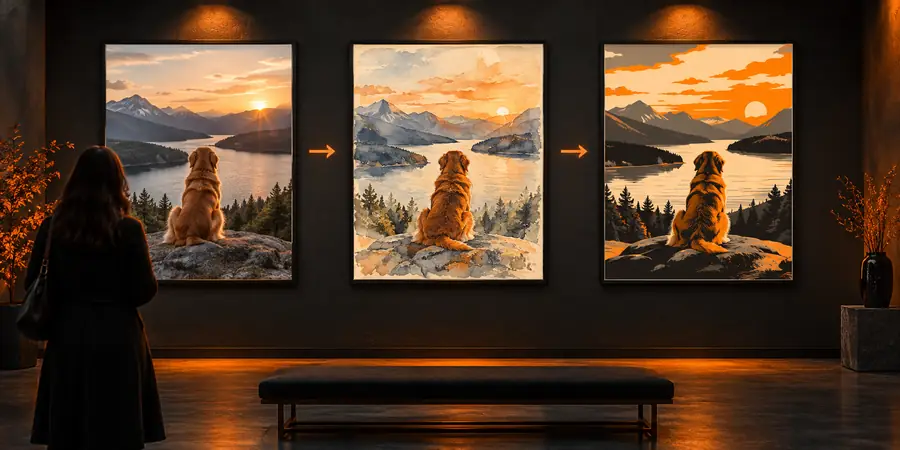
The source guides the result, but the output is newly generated rather than a pixel-for-pixel edit.
Image to image is useful when you already have a visual idea and want to explore it in new directions. Bring a source image, describe the change in plain language, and compare the result with your original intent.
Image to image means generating a new image from an existing image, usually with help from a text prompt. The source provides visual guidance such as composition, subject, pose, or colors, while the prompt describes the intended change.
A traditional editor changes selected pixels through direct operations such as painting, masking, or resizing. Image to image generates an interpretation of the source, so it can make broader creative changes but may also alter details you expected to remain fixed.
A source can be a photograph, drawing, sketch, 3D render, illustration, product image, or other supported picture. Clear images with a recognizable subject and useful composition usually give the model stronger visual guidance.
No. It can preserve broad structure while changing details, but it does not guarantee an exact copy of the subject, face, text, colors, or background. Use a smaller transformation and a precise prompt when continuity matters.
A source image gives the workflow a concrete visual anchor. This makes it useful for creating variations of an existing idea, changing a style or setting, exploring design directions, and keeping a recognizable composition while experimenting.